Development
By Team 14
Introduction
This page details the development of our system, Politics Mapper, from inception to implementation. Our development plan describes the modular approach we took in building our system and the development timeline while the latter sections on this page show the more techincal side of this project: the architectural diagrams, design patterns and our testing approach.
Development Plan
Distinct System Partitions
In our first set of meeting with our client, we worked on breaking down the development of our system into distinct modules which could be developed separately from each other. This was not only done for easier delegation of work but also, mainly, for setting clear deadlines and milestones for the development process. We divided our system into three distinct modules, each of which is described in further detail below.
Downloading and indexing the Hansard data
The first step in constructing any information-retrieval system is to gather that information and store it such that it is both quick to access and easily manipulated. As the Hansard records are already accessible on the internet here, we could have developed an interface for this existing database which would scrape and parse the data from the HTML page and display it to our users.
The advantages, however, of downloading these records and indexing it into our own collection of data are that the data retrieval time is much faster and we have greater control over how the data is segmented and, thus, presented.
After looking at data storage solutions such as Apache Solr, Apache Lucene, SQL and Apache Hadoop, we finally settled on using ElasticSearch for its extensive API and its “more like this” search function, the relevance of this we shall explore in the following sections.
Hosting and Segmentation of data
Our ElasticSearch instance is hosted on a Microsoft Azure server and is easily commutable to our client’s (the BBC) server if they were to continue this project. As well as this data and the source code for our web application, this server also contains php scripts to automatically pull the code from our Github repository, ensuring immediate updates of our system.
One of the primary requirements of our system is the ability to search through the data as well as providing a measure of similarity between search results; the size and format of these segments of records plays a significant role in this.
In requirement RQ04, we stated that we would allow the user to retrieve data of a variety of sizes ranging from individual sentences, paragraphs and whole debates; this, however, was problematic in implementation. We discovered that, due to the often erratic and tangential nature of political debates, the query search would return individual sentences from debates which, as a whole, are not best-fit for the query topic. An example of this could be a query for “David Cameron immigration” which returns a suitable sentence by David Cameron in which he mentions “immigration” but is from a debate which is focussed on the budget. These types of records are common as MPs will often refute another MP’s argument by criticising them ad hominem on another topic - in this case, immigration.
In contrast to this, we decided against allowing the user to search by debate as this would display too much information on the search results page and confuse the user as well as crowd the user interface. Our solution to this problem of segmentation size was to display the results as paragraphs but to allow the user to see the context of each paragraph upon clicking them. By only showing the whole debate when each individual result is viewed, the user is not baffled by the vast text but, also, the user is given a taste of the relevance of the debate before having to click.
Querying the data through a user interface
The third module of our system is the web application which controls the user interface through which queries are submitted and results are displayed; it is an essential component in the usability of our system.
As mentioned above, we decided to use an ElasticSearch instance to index our data on our server as it offered a “more like this” function as a part of it’s API as well as the standard query function. This mlt function returns records which are syntactically similar to another specific record; the existence of this “more like this” API meant that we know longer had to implement a TF-IDF-style similarity search algorithm and could instead tailor this one to fit our needs.
The web-based user interface was built using HTML 5, CSS 3 and Twitter Bootstrap so that it is responsive and easy-to-use on all platforms. We used the Jade templating language in conjunction with Bootstrap for displaying the results from our web application which is built using Node.js and the Express.js framework.
Timeline
-
First meeting with clients
October 2013
In this first meeting with Sebastian and Yves, we identified the main audience of our system, discussed the client requirements and were shown useful resources such as the NLP lectures of Chris Manning.
-
Neuro-linguistic programming research
October 2013
After our first meeting, we spent the subsequent couple of weeks researching the field of neuro-linguistic programming as this is used in search engines. Even if we were not going to code these algorithms ourselves, it was important to know the mathematics behind the idea. As well as the lectures mentioned above, Introduction to Information Retrieval was very useful.
-
TF-IDF research
October 2013
Having read about term frequency-inverse document frequency in our research of NLP, we continued our research with a narrower scope into this field as it seemed both relevant and useful to us in this project.
-
Data storage/management solution
November 2013
The next step in the research for our project was to decide on the way in which we would store and access the data. Originally, we were planning to use Apache Hadoop as it is emerging as one of the best data management platforms but our clients warned us against its use and, instead, pointed us towards other Apache platforms: Lucene and Solr. After researching these, we then discovered ElasticSearch which not only had all of the functionality we wanted from the Apache platforms but also features in-built TF-IDF funtionality.
-
XML to JSON converter
November 2013
The first stage in the development of the system was to download the data from the online Hansard resource, as outlined in the module above. The Hansard data is downloaded as XML so we needed to convert it to JSON in order to use it with our instance of ElasticSearch. This first attempt at a converter was developed in Java by reading XML objects from a file and then using API methods to convert these objects to JSON objects.
-
Download and store Hansard data
November 2013
Once this iteration of the XML to JSON converter was completed, we downloaded the Hansard data, ready to index it in our Elastic Search instance.
-
Hosting of ElasticSearch on Azure
November 2013
At this point, we knew on what platform we were going to store the Hansard data and we had converted it to the appropriate format but we yet to decide on a way of making this data available online. We decided to host the ElasticSearch instance on a Microsoft Azure machine as it was free of charge for us as students and is easy to link to our Github repository. We transferred the Hansard files to this server and indexed them into an ElasticSearch instance.
-
User interface research
December 2013
Having developed a minimally functional back-end of the system with the ElasticSearch instance, the next step was to think about the way in which we would implement the web application and, in particular, the user interface. Our clients had emphasize that we focus on functionality of the UI rather than the design so we looked at the Bootstrap framework as it is responsive which is a required attribute of our web application if it is to be accessible on all platforms.
-
Development of UI prototype
January 2014
For our user interface prototype, we developed a home page, and search results page with Bootstrap, HTML 5 and CSS 3 as well as some JavaScript. For the results page, we hard-coded dummy results to display the features as we had not yet developed the web application. The home page featured a search bar which directed the user to the dummy search page, regardless of input.
-
Replacement of conversion code
January 2014
We discovered an issue with the previous Java conversion code: it was incorrectly formatting segments of HTML within the XML that we were converting to JSON. We replaced this code with a Python conversion script as this was more effective and easier to utilise. We then re-downloaded and indexed the Hansard data.
-
Web application research
January 2014
The next stage in the development of the system was to set up a web application to sit between the user interface and the data in the ElasticSearch instance. We started our research by creating basic Node.js applications and exploring the documentation so that we would be confident when it came to developing the web app. We also conducted research into using the Express.js web application framework and using Jade instead of HTML for displaying the data in the user interface.
-
Deployment of web application on Azure
January 2014
Having conducted extensive research into developing a web application, we deployed a simjple "Hello World" node app on the Azure machine.
-
Added URI search functionality
February 2014
The ElasticSearch instance is now connected to the web application and can be searched by query or similarity through the URI. A query search is of the format: "urltoelasticsearch/<index>/_search?q=querygoeshere" and the similarity search is: "urltoelasticsearch/<index>/<type>/<id>/_mlt"
-
Merged UI prototype with web app
March 2014
Added the web pages from the user interface prototype to the web application such that there is an interface for the user but the functionality is still only accessible through the URI and it displayed as JSON.
-
Results page rewitten in Jade
March 2014
Converted the HTML user interface prototype into Jade and added retrieval of data from the web application rather than the use of dummy data so the results are displayed in an aesthetically pleasing format rather than as JSON. The home page has remained in HTML as conversion is unnecessary.
-
Added querying through the search bar
March 2014
Querying for the regular search can now be done through the home page search bar rather than through the URI as before. The similarity search can also be carried out by clicking the "View similar" button on individual results.
-
Research into adding a timeline
March 2014
After meeting with our clients again, we decided to start work on the timeline that we planned to implement at the beginning of the project. At first, we looked at the D3.js but we then settled on using TimelineJS./p>
-
Development of basic timeline
March 2014
A basic timeline has been developed using the Hansard data. The next step is to implement this on the main application.
-
Added view page for individual results
April 2014
The view page has been added for when the user wants to click a result and view it in full in the context from which it was taken.
-
Optimisation of search functions
April 2014
In another client meeting with Sebastian and Yves we were told to try to optimise the searching functions in ElasticSearch. We optimised the searching by adding constraints to the data fields which the algorithm inspects and regular expression filtering to remove bad results.
Architectural Diagrams
Summary of System Architecture
Our web application is built using node.js. The node app sits on top our search backend which is implemented using ElasticSearch. Our search backend retrieves, pre-processes, indexes, and analyses the Hansard data. The whole thing is hosted on a cluster of Azure servers.
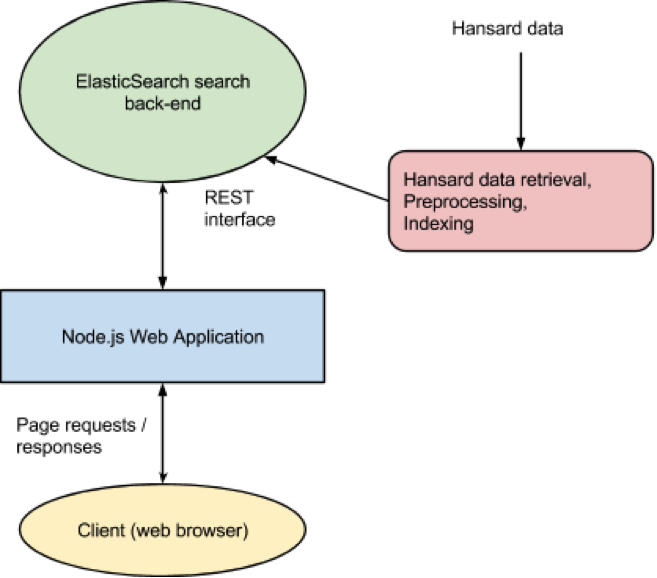
The Web Application
The web application is built using node.js. We use the framework express, which is a popular framework for doing web applications and services. Furthermore, we use the jade library to make templates that generate the HTML for our pages.
The node application’s main purpose is to handle requests from the end-user, query the search back-end, and respond to the end-user with the results from the queries. It communicates with the search back-end through a REST API which is used for performing search and similarity queries.
Data Retrieval, Processing and Indexing
The main functionality of our application is the indexing and analysis of the Hansard data. We index the data to make it searchable and we use the TF-IDF algorithm to find similarities in the data. We use ElasticSearch as the foundation of our search engine. ElasticSearch allows indexing of data through a REST API.
In order to index the data, we start by synchronising with a repository of xml files containing all the debate data. This data is converted to JSON and preprocessed before indexing. The indexing process consists of two steps. Firstly, we generate an index of ids used for lookups of a paragraphs context (prior and subsequent paragraphs), Secondly, the processed JSON data is indexed for searching using ElasticSearch’s API.
Server Infrastructure
PoliticsMapper is hosted on Azure servers. The servers are connected through a virtual network. Each server has an instance of ElasticSearch and an instance of our node.js application running. ElasticSearch automatically detects other nodes in the network and distributes the load and the data so it’s available if one of the nodes go down. All the servers are accessed through a load balancer. This infrastructure allows us to easily scale the product by simply adding more nodes to the cluster.

Technical Achievements
Successfully Used TF-IDF Algorithm to Find Similarities in Large Dataset
One of our main technical achievements is that we successfully have implemented the TF-IDF algorithm for similarity analysis.
TF-IDF is an abbreviation of Term Frequency-Inverse Document Frequency. The idea is basically to count the number of occurrences of each unique term in a document (where the document is a segment of the data). We say this is the term frequency of the term t in a specific document d and we denote this as tft,d where t is our term and d is the specific document. We now have a frequency measure of each term in a document. We want to compare this to the complete collection of documents (the dataset as a whole) in order to see which other documents are similar to this one. Here we could just compare the term frequency of our document to all the others and see which are most similar, but not all terms are going to be relevant. For example, the term frequency of the term “and” will be a high in all documents and is therefore useless as a similarity measure. We denote the document frequency of t as dft, which is defined by the number of documents which contain t. The closer the document frequency of a term is to the total number of documents N, the less important that term is in the similarity calculation. So in order to weigh the term frequency of t in d with the “uniqueness” of the term in the complete document collection, we define the inverse document frequency as idft = log( N / dft). We combine these two measures to tf-idft,d = tft,d×idft. We now have a measure of how relevant a term is in a document.
Built Scalable Web Application
Another of our main technical achievements is our simple and modular architecture. Even though the functionality of a search engine like PoliticsMapper is fairly complex, we have managed to define an architecture that allows us to easily exchange functional components, scale the server infrastructure. We have been able to do this because of our thorough research and ongoing discussions with our clients.
Design Patterns
We have, in our product, made use of several design patterns; these have allowed us to write well-structured and robust code.
Asynchronus Design of Node Application
Node.js is heavily based on the idea of using asynchronous callbacks and calls to functions. This design pattern is used to allow calling parts of code that can be computationally expensive or slow without blocking the thread. By providing a callback function as a parameter in a function call, the result we are interested in is returned whenever the called function is done and sends the result back via the callback function.
This pattern is one of the things that makes our web application fast and responsive.
Use of RESTful Interface for Internal Communication with Search Back-end
Internally in our application we use a RESTful API to communicate between our web application front-end and our search back-end. When indexing documents a bunch of POST requests are sent to the back-end and search queries are performed with GET requests. Using a REST API for communication makes the product more modular as each component is more easily replaceable. Most platforms and languages allow for easy integration with a REST API, so if we for example decided to rewrite the front-end, this would be very easy to do.
Model-View-Controller Pattern on Web Application
Our node.js application makes use of the Model-View-Controller pattern through the express framework. This pattern splits the responsibilities of the application up into three parts; a model, a view and a controller. Our view is our HTML templates (using jade) that generate HTML injected with the results from the controller. The model is in this case just the interfacing with the search back-end which provide the model objects. The controller takes requests from the user, sends queries to the backend and send the results to be rendered in the views.
This pattern makes our web application modular internally and makes our code more structured.
Testing and Evaluation
Unit Tests
One of our testing strategies has been to unit test where possible. This has been done for various functionalities in the node application and the indexing scripts. We have for the node application used the mocha unit test library to do our testing.
An example of one of the vital parts that we have created unit tests for is the context paragraph lookup which is the process of searching our pre-computed index of IDs for a certain ID and returning the IDs immediately prior and after the given ID. The paragraphs corresponding to these ids are then displayed on the view of an individual paragraph (when you press “view” on a result). The search is implemented using a binary search of an ordered list of several million IDs and has been heavily optimised since this is a common operation on a large set of data.
By unit testing a vital functionality like this, we have a significant level of confidence in the reliability of our code.
Iterative Search Optimisation Process
Another place where testing has been important to us is the quality of the search results. This is a somewhat subjective thing and it is not possible to simply write a unit test for this. We have throughout the course of the project been optimising the results of search queries and similarity results. Then testing process has been an iterative process in which we have tried different approaches to optimising the results by for example pre-processing the documents before indexing and post-indexing filtering of results. We have continually been in contact with our clients and they have come with feedback, expertise, and advice on how we could do better on our search and similarity functionalities.